

Modern video projects include writers, marketers, designers, editors, and social teams. Alignment is important at concept, in writing, and in publishing because of different priorities. It can be challenging to provide feedback on scattered files from one revision to the next. Contributors have a clear view of changes and approvals in a shared process. AI generation can accelerate concept testing prior to production. Pippit offers a comprehensive AI marketing content generation and editing platform. Collaboration involves systematically developing, revising, and refining drafts.
What Makes an AI Video Draft Useful for Team Collaboration?
A collaboration-ready draft is a document that conveys the story you want to tell before making production decisions final. Using an AI video generator, an early visual interpretation can be generated, providing reviewers with something tangible. The draft should reflect visual direction, tone, pacing, and audience context. It should contain product information, brand information, captions, and voice-over instructions. Identify areas that need human review, particularly for claims, terminology, and visuals. Keep in mind that the early outputs are working drafts, since scenes generated may have inconsistencies. There is still a need for human review before using the content that is generated.

Divide the Drafting Process Into Clear Creative Responsibilities
Clear roles help to keep feedback focused and enable specialists to contribute without doing the same work. The content planner defines the objective, the content, the target group, and the storyline. The prompt writer converts direction to scenes, actions, tone, pacing, and references. The brand reviewer looks at terminology, identity, tone, and visual consistency throughout the draft. The visual reviewer focuses on compositing, assets, movement, framing, and continuity of shots. The copy reviewer checks and verifies scripts, captions, words, spelling, and facts from approved sources. The publishing owner confirms format, channel requirements, resolution, and export readiness. If the team is large enough, each function can be broken down and divided among the members; if it is small, the responsibilities can be shared among its members.
Create a Shared Draft Brief Before Generating
A shared brief eliminates conflicting feedback as contributors begin from the same creative needs. Prior to generation, define the video purpose, main message, platform, aspect ratio, and video style. Voiceover requirements, reference media, information required, elements disallowed, call to action desired. Include review checkpoints to let the contributors know when to review structure, visuals, copy, or formatting. Pippit can be used with prompts, links, files, and media to give a central starting point for creative work. Seeworld does the same; for full creativity, you can use it along with Pippit. Contextual information about products, campaigns, scenes, or messaging can be found in reference material. A brief is concise – this makes it easier to provide feedback since reviewers can compare outputs and requirements.

Steps to Collaborate with Your Team on Drafts in an AI Video Generator
Step 1: Set Up a Collaborative Video Draft
- Log in to Pippit using your “Google or social media account” before preparing a collaborative video draft.
- Open the “Video generator” from the left menu under the “More” tab to start.
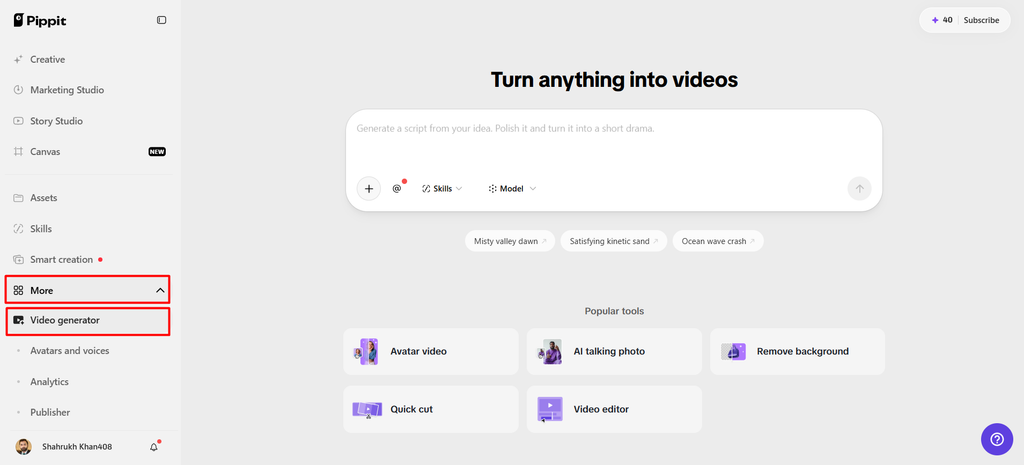
Step 2: Create and Prepare Your Shared Draft
- Select an AI model, such as Dreamina Seedance 2.5, Dreamina Seedance 2.0, or Dreamina Seedance 2.0 Fast.
- You can also select Dreamina Seedance 2.0 Mini, Dreamina Seedance 1.0, or “Auto Route” for flexibility.
- Enter a detailed prompt describing the draft’s scenes, messaging, visuals, pacing, audience, and desired collaborative direction clearly.
- Click “+” to upload reference images or videos from your device, phone, Dropbox, or link.
- You can also select assets when team members need shared media or additional references during creation.
- Choose a suitable aspect ratio under the “Ratio” menu and resolution under the “Resolution” menu.
- Use “@” to tag media or photos inside your prompt when referencing specific shared assets directly.
- Review the complete setup, then click “Generate” to create the initial collaborative video draft.
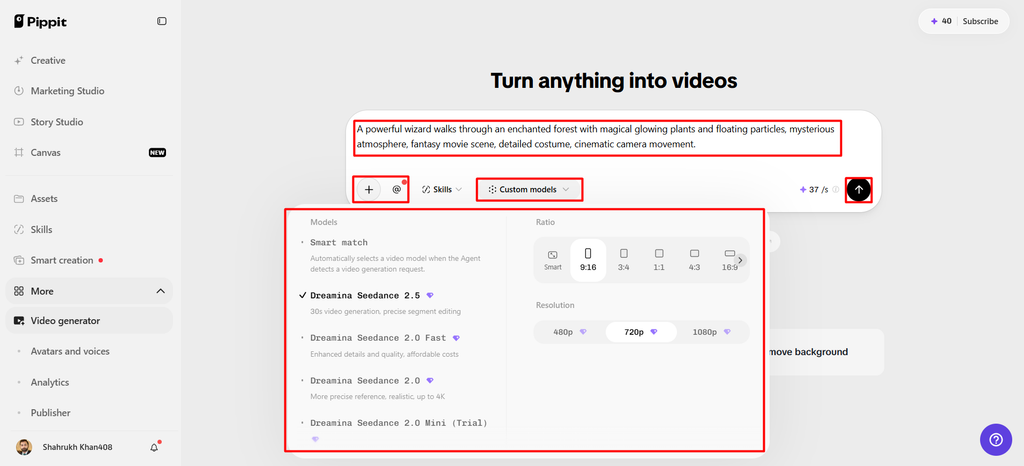
Step 3: Refine the Draft with Team Input
- Preview the draft and review its visuals, messaging, pacing, and overall direction before making team revisions.
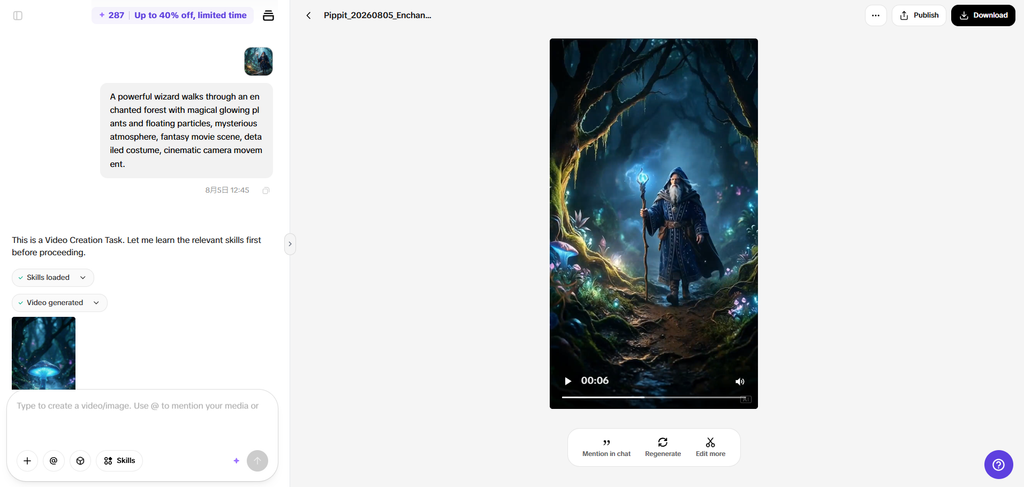
- Click “Regenerate” when changes are needed, or choose “Edit more” for detailed collaborative refinement.
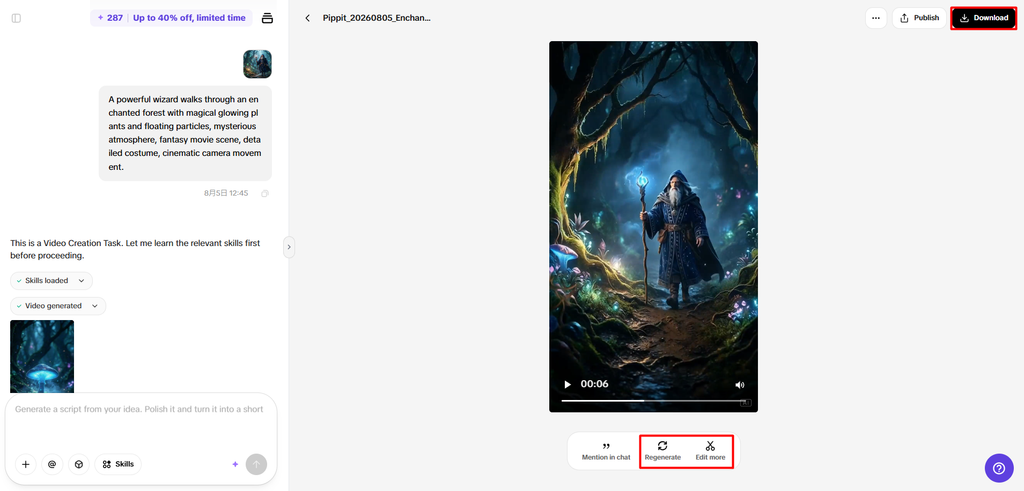
- Customize captions manually, add text, and adjust size, color, alignment, filters, and effects together.
- Add background music, remove backgrounds, and fine-tune visuals according to the team’s agreed creative direction.
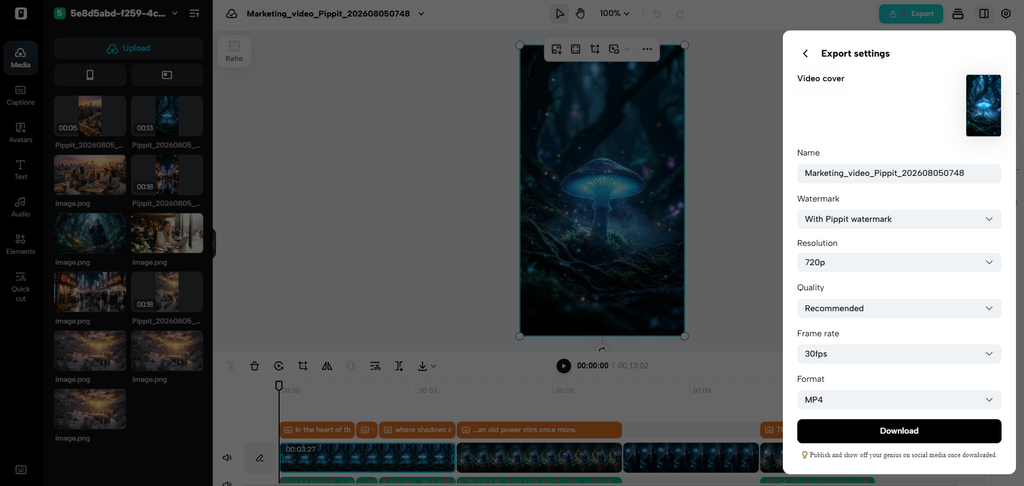
- Click “Download” to export the finalized collaborative video draft to your local device for sharing.
- To publish directly, click “Publish” to schedule and post your video across connected social media channels.
Build a Feedback System That Does Not Create Revision Chaos
Structured feedback helps to clarify reviews and minimizes regeneration. Identify factual mistakes, false claims, missing information, or significant brand issues as “Must change.” Note any structural changes as “Should change.” For optional refinements, use “Could change.” Maintain the main messages. For the elements already approved by stakeholders, use “Do not change.” Use “Needs verification” if something needs to be verified with a source or stakeholder. Specific comments are more effective than a general request, as they indicate the problem and what is expected to be corrected. Do not say “make it better” – explain what you are seeing, the wording, pacing, or visual relationship that needs to be changed.
Six Things Teams Should Check Before Approving a Video Draft
A final review should be undertaken to verify creative quality and publishing requirements. Here are six checks for the draft before it can be approved:
- Accuracy of the message: Ensure that the approved core message is confirmed. Review narration and captions for accuracy.
- Visual consistency: Check subjects, scenes, brand, color, and overall visual direction. Mark any disconnections from one scene to another.
- Prompt alignment: Check against the original creative instructions. Find places where there are disagreements with the agreed concept.
- Text quality: Spelling, terminology, captions, and hierarchy on screen. Maintain readability of important information within each scene.
- Audio balance: Check voiceover clarity, pacing, music, and transitions. Make sure background music does not interfere with verbal information.
- Publishing Readiness: Ensure aspect ratio, resolution, captions, and final messaging. See the entire video before posting.
Use Regeneration and AI Editing as Part of the Review Loop
Regeneration is best when a scene is basically not the agreed brief, or it needs a different approach. Narrower changes can be handled with targeted AI editing, avoiding the need to restart projects. Update captions as wording changes, but keep the general idea and order of the captions. Make adjustments to the filters, effects, text, or visual details when they need a bit of tweaking. If backgrounds detract from the subject or detract from the composition, eliminate them. Complete details of music and presentation when the music experience is out of balance. Have a human sign off on major milestones, especially when there is a major visual or messaging change. This is a loop that separates the larger creative strokes from the smaller creative details.
Conclusion
The key to great collaboration is to get teams aligned on the goals, audience, messages, and creative parameters. A brief is provided to give a common reference point for judging drafts. Structured feedback helps to reduce conflicting revisions and unnecessary generation cycles. Generation, reference media, natural-language editing, and export are combined in Pippit. These can help teams get from idea to content in no time. While AI can streamline the drafting process, human teams still play a crucial role in creative decision-making and fact-checking. Clear responsibilities and checkpoints can help make collaborative production processes possible, turning individual experiments into a cohesive effort.
